공식 문서를 기반으로 정리한다. 본 문서는 mysql과 spring boot의 연동, 초기 설정 sql문 실행 방법을 기술한다.
initializr를 통한 프로젝트 생성

MySQL Driver와 Docer Compose Support, Testcotainers를 사용한다.
intellij로 해당 프로젝트를 열면 디렉토리는 다음과 같다.

(db 는 추후 추가하는 경로이며 없다고 생각함, 위 글은 mysql과의 연결을 테스트 하므로 애플리케이션 코드는 코드로만 footer에 올림)
내가 의도하는 것은 다음과 같다.
1. 도커에서 MySQL 데이터베이스가 실행될 때, 미리 생성할 테이블을 생성한다.
2. user 테이블 접근 애플리케이션 코드 구현(이는 주제에 맞지 않으므로 코드만 footer에 작성)
초기 sql문을 실행시키는 방법은 로컬에 있는 sql파일을 docker를 실행할 때 경로로 옮기면 된다.
즉 내가 만든 sql파일을 적절한 로컬 경로에 넣어주고 관련 파일들을 도커로 옮기는 것이다.
Host는 db/init/schema.sql을 로컬에 만든다.
내용은 다음과 같다
CREATE TABLE IF NOT EXISTS comments (
    id INT AUTO_INCREMENT PRIMARY KEY,
    author VARCHAR(255) NOT NULL,
    comment TEXT NOT NULL
);
comments라는 테이블을 생성 한뒤 id, auther, comment 필드를 생성했다.
간단한 SQL문이므로 설명을 마친다.
db/init 경로를 docker-entry-point-initdb.d 경로로 옮길 것이다. 이 설정은 compose.yaml에 해준다.
services:
  mysql:
    image: 'mysql:latest'
    environment:
      - 'MYSQL_DATABASE=mydatabase'
      - 'MYSQL_PASSWORD=secret'
      - 'MYSQL_ROOT_PASSWORD=verysecret'
      - 'MYSQL_USER=myuser'
    ports:
      - '3306:3306'
    volumes:
      - ./db/init:/docker-entrypoint-initdb.d
위 compose.yaml에서 image명과 환경 변수 그리고 포트, 볼륨등을 지정할 수 있다.
이 외의 환경 변수들에 대한 명세는 https://hub.docker.com/_/mysql 에서 확인할 수 있다.
자료 조사를 하다보니 volumes에서 초기 데이터를 삽입하는 SQL문 또한 사용할 수 있는 것 같다.
application.properties를 작성해주는데 해당 내용에 대해서는 추가로 공부한 뒤 따로 작성할 예정이다.
spring.jpa.hibernate.ddl-auto=update
spring.datasource.url=jdbc:mysql://localhost:3306/mydatabase
spring.datasource.username=myuser
spring.datasource.password=secret
spring.datasource.driver-class-name=com.mysql.cj.jdbc.Driver
spring.jpa.show-sql: true
Trouble Shooting #1 schema.sql이 실행되지 않음(comment 테이블이 생성되지 않음)
intellij에서 애플리케이션을 실행했을 때 테이블이 생성되지 않았다. datagrip으로 조회한 결과 comment테이블이 존재하지 않았다.
애플리케이션 실행시 schema.sql을 실행한 로그가 없었으며, 이는 볼륨을 실행하지 않았다는 것이다.
알아본 결과 도커 컴포즈로 컨테이너를 실행할 때 이미 초기화 된 컨테이너와 볼륨을 다시 초기화 하지 않는다. 따라서 다음 명령어로 컨테이너와 볼륨을 제거한 뒤 실행해야 한다.
docker compose down -v

위 처럼 running /docker-entrypoint-initdb.d/schema.sql 을 확인할 수 있다.
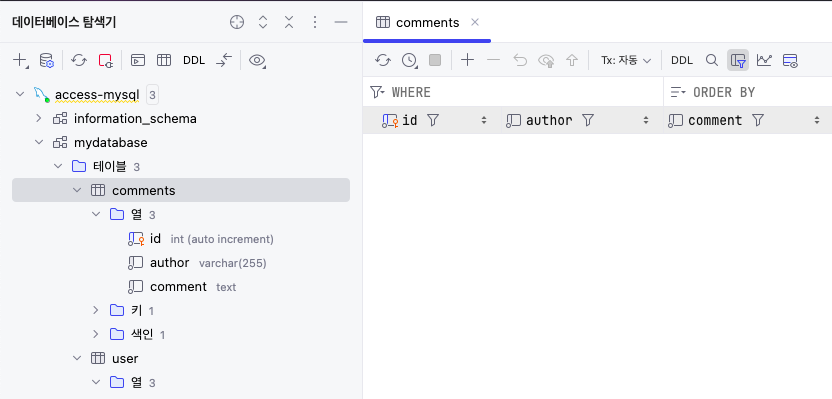
또한 생성된 테이블을 datagrip으로 조회할 수 있었다.
애플리케이션 코드 내용
AccessingDataMysqlApplication.java
package com.example.accessing_data_mysql;

import org.springframework.boot.SpringApplication;
import org.springframework.boot.autoconfigure.SpringBootApplication;

@SpringBootApplication
public class AccessingDataMysqlApplication {

	public static void main(String[] args) {
		SpringApplication.run(AccessingDataMysqlApplication.class, args);
	}

}
MainController.java
package com.example.accessing_data_mysql;

import com.example.accessing_data_mysql.User;
import com.example.accessing_data_mysql.UserRepository;
import org.springframework.beans.factory.annotation.Autowired;
import org.springframework.stereotype.Controller;
import org.springframework.web.bind.annotation.*;

@Controller
@RequestMapping(path="/demo")
public class MainController {
    @Autowired
    private UserRepository userRepository;

    @PostMapping(path="/add")
    public @ResponseBody String addNewUser (
            @RequestParam String name,
            @RequestParam String email
    ) {
        User n = new User();
        n.setName(name);
        n.setEmail(email);
        userRepository.save(n);
        return "Saved";
    }

    @GetMapping(path="/all")
    public @ResponseBody Iterable<User> getAllUsers() {
        return userRepository.findAll();
    }
}
User.java
package com.example.accessing_data_mysql;

import jakarta.persistence.Entity;
import jakarta.persistence.GeneratedValue;
import jakarta.persistence.GenerationType;
import jakarta.persistence.Id;

@Entity
public class User {
    @Id
    @GeneratedValue(strategy = GenerationType.AUTO)
    private Integer id;

    private String name;

    private String email;

    public Integer getId() {
        return id;
    }

    public void setId(Integer id) {
        this.id = id;
    }

    public String getName() {
        return name;
    }

    public void setName(String name) {
        this.name = name;
    }

    public String getEmail() {
        return email;
    }

    public void setEmail(String email) {
        this.email = email;
    }
}
UserRepository
package com.example.accessing_data_mysql;

import org.springframework.data.repository.CrudRepository;

import com.example.accessing_data_mysql.User;

public interface UserRepository extends CrudRepository<User, Integer> {

}'Portfolio 제작기' 카테고리의 다른 글
| 리액트 프로젝트 깃허브 페이지로 배포하기 (Github Actions #2) (0) | 2025.11.11 |
|---|---|
| Github Actions는 무엇인가? (Github Actions #1) (0) | 2025.11.11 |
| [Trouble Shooting] docker mysql이 실행되지 않는 오류 (error number 28) (0) | 2025.11.11 |
| Spring boot 의 Controller, Model, Repository 작성(간단한 예시) (0) | 2025.11.10 |
