목표는 다음과 같다.
main branch로의 push나 merge시 build하고 배포까지 파이프라인을 구축하는 것이다.
먼저 리액트 바이트 프로젝트 생성을 진행한다.
npm create vite@latest portfolio-front

이제 생성된 프로젝트를 깃허브와 연결한다. 이에 대한 설명은 생략한다.
레파지토리에 들어가면 여러 탭들이 있는데 여기서 settings을 들어가준다.

좌측 탭에서 pages 설정으로 가준다.
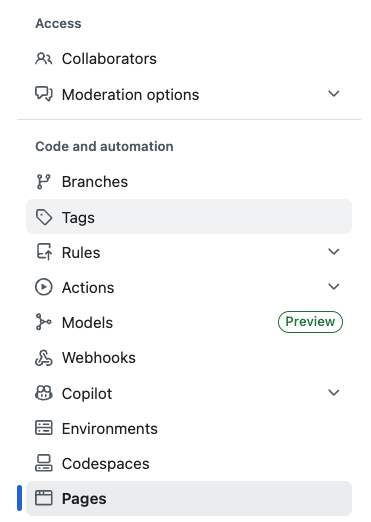
여기서 커스텀 yml을 작성해준다. 작성 내용은 아래와 같고 이는 gpt가 작성해주었다.
# .github/workflows/deploy-frontend.yml
name: Deploy Frontend (Vite → GitHub Pages)

on:
  push:
    branches: [ main ]          # main에 push/merge 시 배포
  workflow_dispatch:            # 수동 실행도 가능

permissions:
  contents: read
  pages: write
  id-token: write

jobs:
  build:
    runs-on: ubuntu-latest
    steps:
      - name: Checkout
        uses: actions/checkout@v4

      - name: Setup Node
        uses: actions/setup-node@v4
        with:
          node-version: 20
          cache: npm

      - name: Install deps
        run: npm ci

      - name: Build
        run: npm run build

      # (선택) SPA 라우팅 404 대응: 404.html = index.html 복사
      - name: SPA 404 fallback
        run: cp dist/index.html dist/404.html

      - name: Upload artifact
        uses: actions/upload-pages-artifact@v3
        with:
          path: dist

  deploy:
    needs: build
    runs-on: ubuntu-latest
    environment:
      name: github-pages
      url: ${{ steps.deployment.outputs.page_url }}
    steps:
      - id: deployment
        uses: actions/deploy-pages@v4
push를 진행한 후 actions에서 로그를 조회할 수 있다.

아래 사진은 깃허브 페이지스로 배포된 주소로 접속했을 때 사진이다.

이로서 메인 브렌치로의 푸시와 병합에 대해서 빌드와 배포 파이프라인을 깃허브 액션을 이용하여 구현하였다. 추후 개념을 보강하여 여러기능에 대해 포스팅할 것이며, 데이터베이스 도커 서버의 빌드파일 작성과 ssh를 이용한 자동 배포를 구현할 예정이다
'Portfolio 제작기' 카테고리의 다른 글
| Github Actions는 무엇인가? (Github Actions #1) (0) | 2025.11.11 |
|---|---|
| [Trouble Shooting] docker mysql이 실행되지 않는 오류 (error number 28) (0) | 2025.11.11 |
| Spring boot 의 Controller, Model, Repository 작성(간단한 예시) (0) | 2025.11.10 |
| Spring boot와 docker mysql 연결 과정 정리(트러블 슈팅 포함) (0) | 2025.11.10 |
